WSi – sheet metal costing software.
WSi is sheet metal costing software that calculates parts and assemblies straight from the CAD file: it reads STEP, DXF and GEO, breaks assemblies down into single parts, sets up the work steps for each part and calculates times, costs and tiered prices. WSi is also the foundation of Costonaut and WSi Shop.
WSi · Graph
A real order, walked through the WSi graph.
WSi models manufacturing as a graph: one node per work step, each with its own geometry, times and costs. Walk the graph of a real order in 3D – a trade-show grill made of a base plate and a grate.
01 · Open
Open STEP, DXF, GEO or a WSi project. The grill arrives as a STEP assembly.
Process graph
The production graph: every node a work step.
This is the graph WSi created for the trade-show grill: one sheet, laser cutting and die bending for each part, and finally joining into the assembly. Below each node are the values WSi determines there.
-

Sheet
- Size
- 3,000 × 1,500 mm
- Thickness
- 2.00 mm
-
Laser cutting
- Quantity
- 1
- Size
- 458 × 349 mm
- Thickness
- 2.00 mm
- Contours
- 41
- Cut length
- 5,906 mm
- Unit time
- 88 s
- Setup time
- 9 min
-
Laser cutting
- Quantity
- 1
- Size
- 364 × 247 mm
- Thickness
- 2.00 mm
- Contours
- 41
- Cut length
- 7,945 mm
- Unit time
- 81 s
- Setup time
- 9 min
-
Die bending
- Quantity
- 1
- Size
- 390 × 236 × 83 mm
- Thickness
- 2.00 mm
- Bends
- 6
- Unit time
- 72 s
- Setup time
- 13 min
-
Die bending
- Quantity
- 1
- Size
- 353 × 224 × 26 mm
- Thickness
- 2.00 mm
- Bends
- 6
- Unit time
- 72 s
- Setup time
- 13 min
-
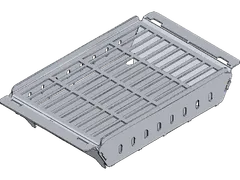
Joining
- Quantity
- 1
- Size
- 390 × 236 × 91 mm
Example calculation
- Qty 1
- 126.01
- Qty 10
- 41.41
- Qty 50
- 33.88
net, per piece
-
Sheet
The raw material. How much of it a part uses, WSi works out from the nesting on the sheet.
-
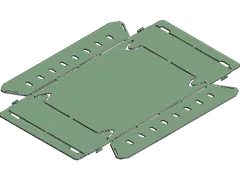
Laser cutting · Base plate
Laser cutting the base plate. Contours, cut length and pierces, together with the motion parameters, determine the unit time.
-
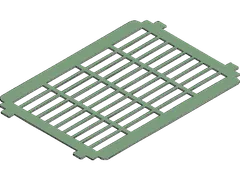
Laser cutting · Grate
The same for the grate: less area but more cut length than the base plate.
-
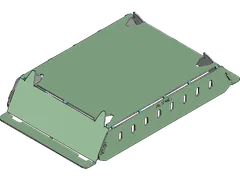
Die bending · Base plate
Die bending the base plate. Tool and bend deduction come from your bend tables; the tool choice can be overridden.
-
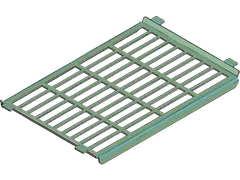
Die bending · Grate
Die bending the grate, with its own setup and unit time.
-
Joining
Joining into the assembly. This is where the part branches meet, and where the grill's tiered prices are.
Work steps
Which manufacturing steps does WSi calculate?
WSi calculates more than 70 sheet metal manufacturing processes. WSi creates cutting, bending, countersinking and joining automatically on import; you add coating, tapping and your own processes.
-
Sheet cutting
Laser cutting with nitrogen or oxygen, plasma and waterjet cutting. WSi nests the parts on the sheet and calculates the cutting time from contour length, pierces, speed and acceleration.
-
Tube cutting
Tubes and profiles, nested along the bar length.
-
Bending
Die bending and sheet metal folding, with bend deduction per material, thickness and tool.
-
Countersinking
WSi recognises countersinks from the hole geometry.
-
Tapping
Threads to ISO M, UNC and more; the time follows from the thread depth.
-
Machining
Drilling, milling, turning and sawing.
-
Deburring and finishing
Manual and automatic deburring, vibratory finishing and cleaning.
-
Welding
MIG, MAG and TIG, spot and stud welding; you choose the welding process per joint.
-
Joining
Press-fitting, bonding and brazing. WSi proposes the joining operations on import.
-
Surface treatment
Powder coating with colour and layer thickness, painting, hot-dip galvanizing, electrogalvanizing, cathodic dip painting and anodizing.
-
Purchase parts
WSi recognises standard and purchase parts in the assembly.
-
Your own processes
Any further work step, costed with your own formula.
Features
WSi features, from import to quotation.
What WSi does for you between the CAD file and the price.
- 01
Automatic assembly breakdown
WSi splits STEP assemblies into single parts and classifies each as a sheet metal, tube or purchase part.
- 02
Nesting
Sheet metal parts on the sheet, tube parts along the bar length – by actual or virtual quantity.
- 03
Bend tables
Bend deduction per material, thickness and tool; the tool choice can be overridden.
- 04
Cutting time from motion parameters
Contour length, pierces, speed and acceleration give the cutting time. A wizard helps you set up the parameters.
- 05
Tiered prices and quotation
Tier quantities per article, cost analysis per process and the quotation as a Word document.
- 06
Bulk import and 2D editor
Import many files at once, preset settings via CSV, and separate DXF files with several parts in the 2D editor.
- 07
ERP connection
Send the bill of materials and graph to your ERP as JSON, over HTTP or as a file – or connect IT-Blech and Trumpf Oseon.
Which file formats does WSi import?
| Format | Type | Assemblies | Extension |
|---|---|---|---|
| STEP .step .stp | 3D | Yes | .step .stp |
| DXF .dxf | 2D | No | .dxf |
| GEO .geo | 2D | No | .geo |
| WSi .wsi | WSi project | Yes | .wsi |
DXF files with several parts are separated in the 2D editor. Sheets, tubes and profiles can also be created directly in WSi.
Download WSi
The links always lead to the latest version of WSi for Windows and Linux. To work with it you need a licence, including for the 30-day trial phase – contact our sales team for either.
System Requirements
Hardware
- x86_64 CPU with SSE4.2
- 16 GB RAM (32 GB recommended)
Windows
- Windows 10 Build 1809
- Windows 11
- Windows Server 2019 or newer
Linux
- Ubuntu 24.04 or newer
- Debian 13 or newer
- Fedora 42 or newer
- openSUSE Tumbleweed
- Other distributions: glibc 2.39 or newer
Integration
The WSi API documentation.
It covers the script API, wsicli and integration with ERP and other third-party systems.
Testimonials
What our customers say
-
“For us, WSoptics is not just a software vendor but a dependable partner that understands our requirements and develops forward-looking solutions together with us.”

-
“The close collaboration produced a solution that is tailored perfectly to our processes.”

-
“For us, that is the combination that makes the difference: software, interface and a real understanding of sheet metal fabrication from a single source.”
Frequently asked questions
What is WSi?
WSi is software for costing and work preparation of sheet metal parts and assemblies. It reads CAD files, breaks assemblies down into single parts, lays out every manufacturing step, and calculates times, costs and tiered prices from that.
Which file formats can WSi import?
WSi imports STEP, DXF and GEO files, as well as its own WSi project files. STEP files are read with their assembly structure; DXF files containing several parts are split apart in the 2D editor.
Which manufacturing processes does WSi calculate?
WSi costs laser, plasma and waterjet cutting, tube cutting, die bending and sheet metal folding, welding and other joining processes, and surface treatments such as powder coating, painting and hot-dip galvanising – more than 70 processes in all. Custom processes can be added.
Can WSi cost entire assemblies?
Yes. WSi explodes whole assemblies automatically and categorises sheet metal parts, tube parts and purchased parts, without you having to break the assembly apart by hand.
Does WSi integrate with my ERP system?
Yes. WSi sends the bill of materials and the process graph to your ERP system as JSON, over HTTP or as a file. IT-Blech and Trumpf Oseon have their own dedicated interfaces.
Which formats does WSi export?
Geometry as STEP, DXF, SVG, GEO and glTF; bills of materials as JSON and CSV; bending drawings and routing slips as PDF or DOCX; and quotes as DOCX.
Can WSi run without a user interface?
Yes. With wsicli, WSi runs script modules from the command line – for example to sync the database with your ERP system – or answers requests as an HTTP service. The script API is in JavaScript and TypeScript.
Is there a trial phase?
Yes, WSi can be trialled for 30 days. The trial phase needs a licence too, which our sales team will arrange for you. Any customisation made during the trial carries over when you move into production use.
What are the system requirements?
WSi needs an x86_64 CPU with SSE4.2 and 16 GB of RAM (32 GB recommended). Supported operating systems are Windows 10 build 1809, Windows 11, Windows Server 2019 or newer, Ubuntu 24.04 or newer, Debian 13 or newer, Fedora 42 or newer, openSUSE Tumbleweed, and any other Linux distribution with glibc 2.39 or newer.
Which operating systems does WSi run on?
WSi is available for Windows and Linux, not for macOS. The installers for the latest version are at the top of the WSi page.
What happened to WSi4?
WSi4 is now called WSi. It is the same software under a new name; existing licences continue unchanged.
See WSi with your own assembly.
In 30 minutes we show you how your STEP file becomes a price – live, with your data.